

📝 Blog Summary
VoIP load balancing keeps your call infrastructure stable during traffic spikes, and FreeSWITCH enables it effectively. This guide breaks down which VoIP protocols load balancers actually distribute, how FreeSWITCH fits into the picture, and the exact setup steps to follow. You’ll also find best practices, troubleshooting tips, and security insights to help you scale without the call-quality trade-offs.
FreeSWITCH load balancing distributes SIP signaling and RTP media traffic across multiple FreeSWITCH instances using a SIP proxy like Kamailio or OpenSIPS. It prevents single-server overload, enables horizontal scaling, and maintains call quality during traffic spikes through algorithms like round-robin, least-connections, and weighted distribution.
Since VoIP entered the business communications landscape, it has reshaped how teams connect with customers, faster, leaner, and without the hardware bills of traditional telephony. But like any great technology, even the most powerful VoIP systems aren’t ready for occasional disasters, such as uneven call traffic, server overload, or latency issues.
Therefore, load balancing is critical for VoIP systems to ensure consistent performance. You can use FreeSWITCH to set up load balancing for your VoIP platform and configure a FreeSWITCH server to act as the outbound call line handler. If you’d rather not handle the setup in-house, you can hire FreeSWITCH developers to do it for you.
In this blog, you will get an overview of FreeSWITCH for load balancing, its benefits, best practices, and some common challenges in load balancing setup.
Most importantly, you will learn how to set up load balancing for your VoIP using FreeSWITCH.
What is VoIP Load Balancing?
VoIP load balancing is the practice of distributing voice traffic, signaling, and media streams across multiple servers so no single server becomes a chokepoint. It keeps call quality consistent, prevents overload-related drops, and gives your infrastructure room to scale without breaking under peak loads.
In a typical VoIP setup, calls involve two distinct traffic types: signaling (call setup, routing, and teardown) and media (the actual voice).
Both can be load-balanced, but they’re handled differently. Signaling is usually managed through a SIP proxy, while media may be distributed via RTP-aware proxies or media servers, the classic Kamailio vs FreeSWITCH split. The goal stays the same across both: even distribution, fewer single points of failure, and predictable performance under pressure.
Which VoIP Protocols Can Load Balancers Distribute?
Load balancers can distribute SIP, RTP, IAX2, H.323, and WebRTC, though SIP and RTP are the two most commonly balanced in modern VoIP deployments. SIP handles call signaling, RTP carries the actual voice media, and both benefit from intelligent traffic distribution. Other protocols, such as IAX2 and H.323, can also be balanced, though they’re less common in modern deployments.
Here’s a quick breakdown of what a load balancer typically handles in a VoIP environment:
- SIP (Session Initiation Protocol): The most widely load-balanced VoIP protocol. SIP proxies such as Kamailio and OpenSIPS distribute SIP requests across FreeSWITCH instances using algorithms such as round-robin, least connections, or weighted distribution.
- RTP (Real-time Transport Protocol): Carries the actual voice and video media. RTP traffic can be balanced via media proxies (such as RTPProxy or RTPEngine) to prevent media server overload and reduce latency.
- IAX2 (Inter-Asterisk eXchange): Used primarily in Asterisk environments, IAX2 combines signaling and media into one stream, making it simpler to balance but less flexible than SIP.
- H.323: An older VoIP protocol still found in legacy enterprise setups. It can be load-balanced, but most modern deployments have migrated to SIP.
- WebRTC: For browser-based calling, WebRTC traffic can be distributed through SIP-WebRTC gateways and media servers.
For most FreeSWITCH deployments, SIP and RTP are the two protocols you’ll actively balance and that’s exactly what the rest of this guide covers.
What is FreeSWITCH Load Balancing?
FreeSWITCH load balancing is a technique for optimizing VoIP network performance using the open-source telephony platform FreeSWITCH. It distributes incoming SIP (Session Initiation Protocol) traffic and call processing workload across multiple servers. This technique helps to prevent any single server from becoming overloaded.
You can imagine this as if you own a restaurant and there is a heavy rush of customers today. Now, they all crowd at one table, making the environment congested. So, a staff member will help customers find a table and distribute the crowd across all available tables at your restaurant. The person here is acting as a load balancer, using FreeSWITCH.
The purpose of FreeSWITCH load balancing is to distribute the load on servers. At the same time, you achieve maximum resource utilization while minimizing the risk of service interruption from overload or server failure.
What Are the Key Benefits of FreeSWITCH Load Balancing?
FreeSWITCH load balancing isn’t just about handling more calls; it’s about making your entire VoIP system more predictable, more resilient, and easier to scale. The benefits show up across performance, uptime, and operational simplicity, and they compound as your call volume grows.
Here’s where you’ll feel the impact most:
1. Improved VoIP Performance and Reliability
Load balancing distributes SIP signaling and RTP (Real-time Transport Protocol) media streams across multiple FreeSWITCH instances. This distribution mitigates single points of failure, ensuring that if one instance becomes unavailable, others can continue processing calls.
Furthermore, by distributing the computational load associated with call processing (e.g., transcoding, media mixing), load balancing reduces latency and jitter, improving call quality. The distribution also minimizes resource contention, leading to a more predictable call flow.
Developer-level improvements often drive these optimizations. FreeSWITCH developers enhancing VoIP is a big part of what makes these systems scale.
2. Reduced Downtime and Better Call Distribution
A load balancer acts as a SIP proxy, inspecting incoming SIP requests and directing them to available FreeSWITCH servers according to predefined algorithms (e.g., round-robin, least-connections, load-based). Solutions like Kamailio SIP Proxy are often used in such scenarios to efficiently manage SIP signaling. This redundancy significantly reduces downtime, as the load balancer can automatically redirect traffic away from failed or overloaded servers.
The load balancer can also perform health checks on FreeSWITCH instances, removing unhealthy servers from the pool. This intelligent call distribution ensures optimal resource utilization and minimizes the impact of server failures on call quality.
3. Scalability for Growing VoIP Businesses
Load balancing enables horizontal scaling, allowing you to add more FreeSWITCH servers to handle increasing call volumes. The load balancer abstracts the complexity of managing multiple servers, presenting a single entry point for SIP traffic.
This simplifies network configuration and management, making it easier to scale your VoIP infrastructure. The load balancer can also employ dynamic scaling techniques, automatically adjusting the number of active servers based on real-time traffic patterns.
4. Efficient Handling of High Call Volumes
By distributing call processing workloads across multiple servers, load balancing prevents any single server from becoming a bottleneck. This is particularly important during peak call volumes, when a single server may struggle to handle the load. Load balancing ensures calls are processed efficiently, minimizing latency and preventing call drops.
Also, by distributing the workload, the CPU and memory on the FreeSWITCH servers are used more evenly, allowing for more concurrent calls.
Together, these four benefits explain why FreeSWITCH has become a go-to choice for businesses serious about VoIP scale. The real value isn’t any single benefit on its own – it’s how they stack: better performance feeds reliability, reliability supports scale, and scale handles the volume growth that comes with it.
How Do You Set Up a FreeSWITCH Load Balancer for VoIP?
This section may be overwhelming because it is more technical, but don’t worry.
We will understand the complete setup in 2 major parts:
1) Foundation, and
2) Steps involved
1) Laying the Foundation
A. Robust FreeSWITCH Server Infrastructure:
You’ll need multiple FreeSWITCH instances, each with its own dedicated resources (CPU, RAM, network bandwidth). These servers should be configured consistently to ensure uniform capabilities for call processing. Ensure each FreeSWITCH server has a static, routable IP address and a well-defined SIP profile.
B. Dedicated Load Balancer Server with SIP Proxy Software:
A dedicated server, separate from the FreeSWITCH instances, is crucial. This server will host the SIP proxy software (OpenSIPS or Kamailio), which acts as the central traffic director for all SIP requests entering your VoIP network. The load balancer server should have ample network bandwidth and processing power to handle the anticipated call volume.
C. Network Topology and Connectivity:
A strong and fast network is essential for good performance. Every server, including FreeSWITCH and the load balancer, must have reliable connectivity to allow smooth communication. It’s also necessary to define clear network segments and specific firewall rules to protect the VoIP network from threats. This helps create a safe space for all communications.
D. SIP and FreeSWITCH Configuration Expertise:
Understanding the Session Initiation Protocol (SIP) is very important. Knowing how to configure FreeSWITCH files to improve communication systems is also essential. Knowing about load balancing helps manage traffic smoothly. Additionally, familiarity with the configuration language of SIP proxy software is necessary to create solutions that meet specific needs.
2) Building the Structure
A. Deployment and Configuration of the SIP Proxy:
Install your chosen SIP proxy software (OpenSIPS or Kamailio) on the dedicated load balancer server. Define routing logic that dictates how SIP requests should be distributed. For example, round-robin is used for equal traffic sharing or the least connections for load-aware distribution. Configure the SIP proxy to listen on standard ports (e.g., UDP/TCP 5060) and apply security hardening, such as TLS support and IP safe listing.
B. FreeSWITCH Server Registration:
Each FreeSWITCH instance should be configured to register with the proxy as a SIP endpoint. This involves setting the proxy and outbound proxy to the registrar within the FreeSWITCH SIP profile configuration. Additionally, you can enable periodic keep-alive or OPTIONS pings from FreeSWITCH to let the proxy know it’s online. This registration process is vital for dynamic routing and accurate health monitoring.
C. Load Balancing Logic Implementation:
Implement your chosen algorithm inside the SIP proxy config by referencing the registered FreeSWITCH endpoints. For example, with Kamailio, you can use the dispatcher or load_balancer modules to handle call distribution. Implement real-time health checks using SIP OPTIONS to ping each server, and define logic to exclude servers that fail to respond. For more flexibility, you can add priority tiers and retry strategies in your routing logic.
D. Health Monitoring and Failover:
Continuously monitor the availability of each FreeSWITCH server via automated health checks. The SIP proxy should be configured to send periodic SIP OPTIONS messages and interpret the responses. If a server becomes unresponsive, the load balancer should dynamically remove it from the pool and reroute calls to healthy servers. This not only improves reliability but also reduces manual intervention during outages.
E. Thorough Testing and Validation:
Before going live, simulate various scenarios, including peak loads, node failures, and proxy restarts. Use tools such as sngrep, Wireshark, or SIPp to visualize and stress-test SIP signaling. Verify that your call traffic is properly balanced and that failovers occur seamlessly. Document your test results and ensure that alerts or monitoring dashboards are in place to provide real-time visibility post-deployment.
Now that you know how to set up a load balancer for VoIP, it’s time to learn how to make it more effective. In the next section, we’ll explore this further.
What Are the Best Practices for FreeSWITCH Load Balancing?
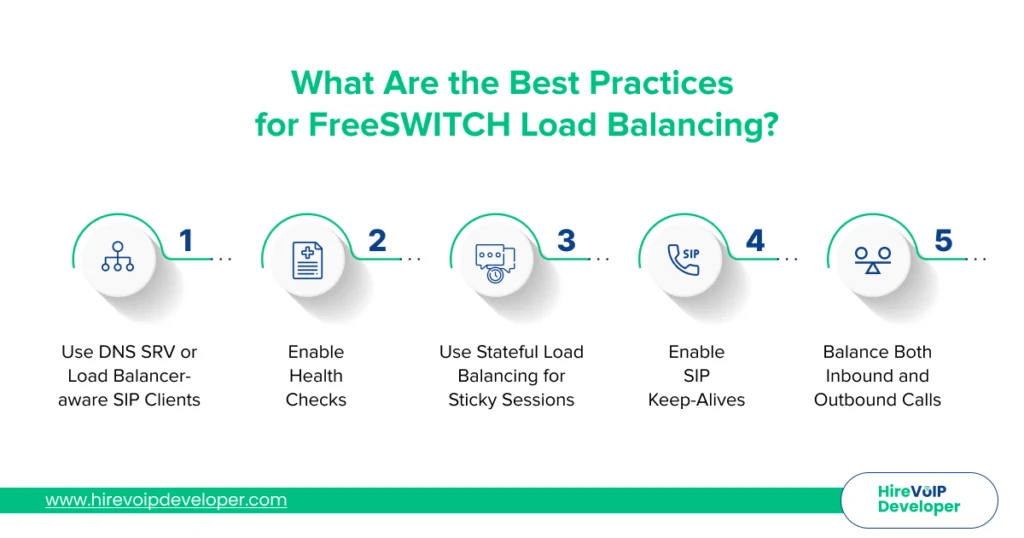
For optimal FreeSWITCH load balancing, the right setup is only half the equation; what keeps it running well over time is how you operate it day to day. A combination of hardware and software load balancers, paired with a strong failover strategy, lays the groundwork, but the real difference shows up in small operational habits.
Here are the best practices that consistently separate stable VoIP setups from fragile ones:
1. Use DNS SRV or Load Balancer-aware SIP Clients
Instead of just dialing one number, your phone can ask, “Hey, who’s available?” Using DNS SRV records or clients that understand load balancing, your phones can pick the best FreeSWITCH server on the fly. This means if one server’s having a bad day, your calls just keep on truckin’. It’s all about making your phone adaptable.
2. Enable Health Checks
You wouldn’t want to send customers to a closed restaurant, right? The same goes for your FreeSWITCH servers. We’ll set up health checks on your load balancer so it constantly asks, “Are you good, FreeSWITCH server?” If a server isn’t responding, it is automatically removed from the rotation. This keeps your calls flowing smoothly without any hiccups.
3. Use Stateful Load Balancing for Sticky Sessions
Have you ever had a long chat with someone and suddenly been switched to someone else? Annoying, right? Some exceptionally long calls must stay on the same FreeSWITCH server. Stateful load balancing makes sure that happens. It’s like keeping the conversation going with the same person without interruptions.
4. Enable SIP Keep-Alives
Sometimes, firewalls and routers can be forgetful. They might close your SIP connections if they’re idle for too long. SIP keep-alives are like little nudges, reminding those connections that they’re still needed. This prevents dropped calls and keeps things running smoothly.
5. Balance Both Inbound and Outbound Calls
Getting caught up in incoming calls is easy, but don’t forget the ones going out. Your FreeSWITCH servers work in both directions, so balance the load across both. Monitoring and balancing outbound calls is just as important as inbound calls.
None of these practices is a heavy lift on its own, but together they’re what separates a load balancer setup that works on day one from one that holds up six months in. Treat them as the baseline, not the optimization layer; the optimization comes after these are running cleanly.
Top Troubleshooting Challenges in FreeSWITCH VoIP Load Balancing
Even a well-configured FreeSWITCH load-balancer setup runs into trouble at some point; that’s the nature of any system handling real-time traffic. The good news is that most issues fall into a handful of recurring patterns, and once you know what to look for, fixing them gets faster.
Here are the three most common challenges teams hit, and how to work through each:
1. Load Balancing Inconsistencies
Sometimes, even with a good setup, calls may not be shared evenly. Some FreeSWITCH servers can get overloaded while others have little to do. This usually happens due to configuration issues.
To avoid inconsistencies, double-check your load balancer’s configuration. Make sure your routing rules are solid, and your health checks are working correctly. Next, give your network a good once-over. Look for any bottlenecks or connectivity issues that could be throwing things off. And don’t forget to check your FreeSWITCH server registrations. If they are not registering correctly, the load balancer will not send traffic to them.
2. Performance Bottlenecks
Your VoIP system might experience issues such as dropped calls, delays, or overall poor performance.
It’s time to put on your detective hat and monitor your traffic. Use tools to see where the slowdowns are happening. Then, start optimizing your settings. Factors such as codec selection, media handling, and database queries can all affect performance. Also, keep an eye on your server resources. You should add more resources if your CPU or memory is maxed out. Finally, if you use a database, ensure it is optimized and responds quickly.
3. Security Vulnerabilities
In today’s world, security is no joke. VoIP systems can be targets for attacks, so you need to be proactive.
Here, the firewall is your first line of defense. Make sure it’s configured to block any unwanted traffic. Then, consider adding an intrusion detection system. This will help you spot any suspicious activity. Also, keep your software up to date. Security patches are crucial for staying ahead of the bad guys. And don’t forget about strong passwords and access controls. It’s all about layering your defenses. Using TLS and SRTP for encrypted communication is also a must.
Most FreeSWITCH load-balancing issues fall into one of three buckets: uneven distribution, performance drag, or security gaps. The fix isn’t usually a complete rebuild; it’s spotting the symptom early and tightening the right setting. Build monitoring and review cycles into your operations, and most of these problems get caught before they reach your users.
Wrapping Up
A well-executed FreeSWITCH load-balancer setup is key to maintaining a scalable, high-performing VoIP system. From distributing SIP traffic intelligently across multiple servers to handling high call volumes with minimal latency, FreeSWITCH load balancing benefits modern businesses by reducing downtime, optimizing server resources, and ensuring consistent call quality.
You can significantly improve FreeSWITCH performance by following best practices such as health checks, sticky sessions, SIP keep-alives, and balancing both inbound and outbound traffic. Of course, challenges like routing inconsistencies, performance bottlenecks, and security gaps can arise, but a solid strategy can minimize their impact.
If you’re wondering how to set up load balancing for VoIP or need support with your FreeSWITCH SIP load balancer configuration, our experts’ help can make all the difference. Hire a dedicated FreeSWITCH developer from Hire VoIP Developer and get expert assistance specific to your business needs.